The refund request endpoint allow you to refund a charge that has previously been processed but not yet refunded. Funds will be refunded to the credit / debit card or mobile money wallet that was originally charged.
The ability to process a refund has the following limitations:
The URL to our RequestRefund API is either:
Bearer Token : Use token generated during authentication.
Accept: The response format, which is required for operations with a response body.
Content-Type: The request format, which is required for operations with a request body.
| Parameter | Required | Description |
|---|---|---|
| Accept | Required |
Should be set to application/json |
| Content-Type | Required |
Should be set to application/json |
| Parameter | Type | Required | Description |
|---|---|---|---|
| confirmation_code | String | Required |
This refers to payment confirmation code that was returned by the processor |
| amount | Float | Required |
Amount to be refunded. |
| username | String | Required |
Identity of the user who has initiated the refund. |
| remarks | String | Required |
A brief description on the reason for the refund. |
    {
        "confirmation_code": "AA11BB22",
        "amount": "100.00",
        "username": "John Doe",
        "remarks": "Service not offered"
    }
After successfully placing a refund request, a request will be sent to our finance team to start processing the refund.
| Name | Type | Description |
|---|---|---|
| error | Integer | 200 - Refund received successfully and is being processed. 500 - Refund rejected. |
| message | String | A brief summary of the response received. |
Status 200 mean your request to process the refund has been received successfully. However, please note that this does not mean the refund has been effected. Pesapal has to get the go ahead from the merchant before finalising the refund.
Status 500 mean your request to process the refund was rejected for one reason or another. Refer to the error message for more details.
    {
        "status": "200",
        "message": "Refund request successfully"
    }
Recurring payment is a payment model where customers authorize the business to pull funds from their accounts automatically at regular intervals for the goods and services provided to them on an ongoing basis.
With Pesapal's subscription based payments, customers can set automated card payments on their account where they can be debited automatically at a different set times. Examples of services one can enroll to include cable bills, cell phone bills, gym membership fees, utility bills and magazine subscriptions. These payments can be set to run an various intervals such as daily, weekly, monthly or yearly.
Enable our subscription based payments by passing an additional account_number field when sending data to our SubmitOrderRequest endpoint. This account_number should relate to an account number / invoice number that helps you identify the payment.
Note: It's critical that you get to understand all other Pesapal API 3.0 endpoints before implementing the recurring feature. Click here to get started.
In adition to the SubmitOrderRequest parameters, include one more param as show below.
| Parameter | Required | Description |
|---|---|---|
| account_number | Optional |
Customer's identification number know to your system. This can be an invoice number or an account number. |
    {
        "id": "AA1122-3344ZZ",
        "currency": "KES",
        "amount": 100.00,
        "description": "Payment description goes here",
        "callback_url": "https://www.myapplication.com/response-page",
        "notification_id": "fe078e53-78da-4a83-aa89-e7ded5c456e6",
        "billing_address": {
            "email_address": "[email protected]",
            "phone_number": "0723xxxxxx",
            "country_code": "KE",
            "first_name": "John",
            "middle_name": "",
            "last_name": "Doe",
            "line_1": "Pesapal Limited",
            "line_2": "",
            "city": "",
            "state": "",
            "postal_code": "",
            "zip_code": ""
        },
        "account_number": "555-678"
    }
After successfully processing your request using the SubmitOrderRequest endpoint, the customer will be shown an option to opt into the recurring model on the Pesapal iframe during payment. The customer will then configure the frequency (Daily, weekly, monthly, quarterly or yearly), set a start and enddate, and finally enter an amount to be automatically deducted from their card on each payment cycle.

Once the customer has made a successful payment, Pesapal will automatically create a scheduled subscription on their behalf and an email alert will be sent to the provided card billing email that was used during the payment proccess, notifying them of the newly created subscription together with a link they can access a dashboard to manage their subscription.
Pesapal will NOT store the customer's card details. Instead, Pesapal has implemented the card tokenization technology.
Credit card tokenization is the process of de-identifying sensitive cardholder data by converting it to a string of randomly generated numbers called a "token." Similar to encryption, tokenization obfuscates the original data to render it unreadable to a user. Unlike encryption, however, credit card tokenization is irreversible.
Yes, in cases where your application already handles the process where the customer opts into a subscription based model from your application, Pesapal allows your to send these extra parameters via the API. This ensures that the user does not have to fill in the same details again (on your application and on the Pesapal Iframe).
However, it's important to note that the customer MUST accept to enroll to your subscription on the iframe. They will however not be able to edit the subscription details on the iframe.
In adition to the account_number parameter included in the SubmitOrderRequest, you are required to send the following parameter.
| Parameter | Required | Description |
|---|---|---|
| subscription_details | Optional |
Customer Subscription Object You can pass subscription data to Pesapal allowing a user to setup recurring payment.. |
| Name | Type | Required | Description |
|---|---|---|---|
| start_date | String | Mandatory |
Your subscription's start date in the format dd-MM-yyyy e.g 24-01-2023 representing 24th Jan 2023 |
| end_date | String | Mandatory |
Your subscription's end date in the format dd-MM-yyyy e.g 31-12-2023 represeting 31st Dec 2023 |
| frequency | String | Mandatory |
The period billed to the account is set out in the user contract. For instance, if users subscribe to a monthly service. Accepted values include DAILY, WEEKLY, MONTHLY or YEARLY |
    {
        "id": "AA1122-3344ZZ",
        "currency": "KES",
        "amount": 100.00,
        "description": "Payment description goes here",
        "callback_url": "https://www.myapplication.com/response-page",
        "notification_id": "fe078e53-78da-4a83-aa89-e7ded5c456e6",
        "billing_address": {
            "email_address": "[email protected]",
            "phone_number": "0723xxxxxx",
            "country_code": "KE",
            "first_name": "John",
            "middle_name": "",
            "last_name": "Doe",
            "line_1": "Pesapal Limited",
            "line_2": "",
            "city": "",
            "state": "",
            "postal_code": "",
            "zip_code": ""
        },
        "account_number": "555-678",
        "subscription_details": {
            "start_date": "24-01-2023",
            "end_date": "31-12-2023",
            "frequency": "DAILY"
        }
    }
After successfully processing your request using the SubmitOrderRequest endpoint, the customer will be shown an option to opt into the recurring model on the Pesapal iframe during payment. The iframe will this time load without he options to re-select the Frequecy, period and dates.
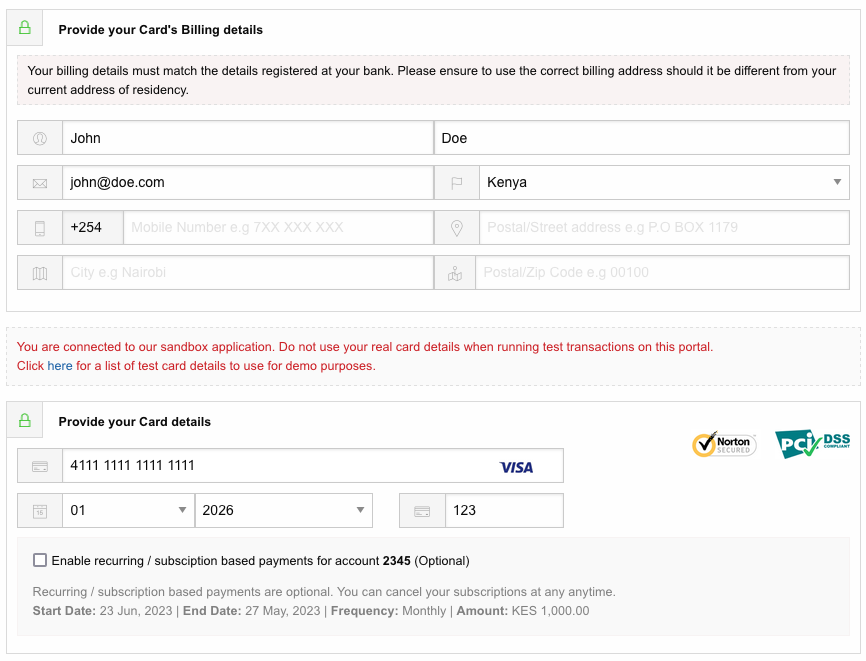
Yes, customers have the right to cancel their subscription at anytime. Pesapal will send them email alerts a day or two prior to charging their cards. This ensures customers are always aware of all upcoming charges giving them the freedom to opt out or pausing their subscriptions.
We currently support Visa and MasterCard for recurring payments. More card options will be enabled in the near future.
Once a schedule is created and executed successfully, Pesapal will trigger an IPN (Instant Payment Notification) to the IPN endpoint you provided when calling the SubmitOrderRequest endpoint. This IPN call will have the OrderNotificationTypei> set as RECURRING.
The IPN alert will either be a GET or POST request, depending on which HTTP method you selected when registering the IPN URL. Click here for more details on how to register your IPN endpoint.
The IPN call will have the following parameters;
| Parameter | Type | Description |
|---|---|---|
| OrderTrackingId | String | Unique order id generated by Pesapal. |
| OrderNotificationType | String | Value set as RECURRING to represent a Recurring IPN call. |
| OrderMerchantReference | String | Your account number received as part of the SUBMIT ORDER REQUEST. |
In addition to the normal payment status details received from the GetTransactionStatus endpoint, Pesapal will append an object subscription_transaction_info containing some additional recurring payment data
| Name | Description |
|---|---|
| account_reference | Customer's identification number know to your system. This can be an invoice number or an account number. |
| amount | Amount paid by the customer. |
| first_name | Customer's first name. |
| last_name | Customer's last name. |
| correlation_id | Pesapal's unique recurring payment identifier / id. |
    {
        "payment_method": "Visa",
        "amount": 100,
        "created_date": "2022-04-30T07:41:09.763",
        "confirmation_code": "6513008693186320103009",
        "payment_status_description": "Failed",
        "description": "Unable to Authorize Transaction.Kindly contact your bank for assistance",
        "message": "Request processed successfully",
        "payment_account": "476173**0010",
        "call_back_url": "https://test.com/?OrderTrackingId=7e6b62d9-883e-440f-a63e-e1105bbfadc3&OrderMerchantReference=555-678",
        "status_code": 2,
        "merchant_reference": "1515111111",
        "payment_status_code": "",
        "currency": "KES",
        "subscription_transaction_info": {
            "account_reference": "555-678",
            "amount": 100,
            "first_name": "John",
            "last_name": "Doe",
            "correlation_id": 111222
        },
        "error": {
            "error_type": null,
            "code": null,
            "message": null,
            "call_back_url": null
        },
        "status": "200"
    }
Once you've fetched the recurring data, you are then required to store the same in your system and provide services / goods as subscribed.
Your IPN endpoint should then respond to Pesapal with a json string confirming service delivery. Part of the json string contains a status parameter that should be set as 200 (meaning request was received and processed) or 500 (meaning request was received but there was an issue providing the services).
Sample JSON Response String: {"orderNotificationType":"RECURRING","orderTrackingId":"d0fa69d6-f3cd-433b-858e-df86555b86c8","orderMerchantReference":"555-678","status":200}PAGE NOT FOUND
Sorry the page you are looking for cannot be found,kindly use the menus at the top of the page to find what you are looking for
Test your integration on https://demo.pesapal.com before you take your site live!
Download the version of PesaPal.API.dll most suitable for you from the downloads section.
Example: Payment.aspx
You can now embed PesaPal directly in your site, providing a seamless experience to your customers.
You can do this by inserting an iframe on the page on your site customers land on when they checkout:
<iframe src="/<%=GetPesapalUrl()%>" width="100%" height="620px" frameborder="0" scrolling="auto" />
Please note: the value for the src attribute should be "<%=GetPesapalUrl()%>" (without the leading /). [It is being added automatically by our CMS and we are still trying to figure out how to get rid of it!]
In the code behind file, Payment.aspx.cs, add the method GetPesapalUrl(). This is where most of the work happens.
using Pesapal.API;
using System.Linq;
...
protected string GetPesapalUrl()
{
   Uri pesapalPostUri = new Uri("https://demo.pesapal.com/API/PostPesapalDirectOrderV4"); /*change to
      https://www.pesapal.com/API/PostPesapalDirectOrderV4 when you are ready to go live!*/
   Uri pesapalCallBackUri = new Uri(/* link to the page on your site users will be
      redirected to when the payment process has been completed */);

// Setup builder
   IBuilder builder = new APIPostParametersBuilderV2()
           .ConsumerKey(/* Your PesaPal Consumer Key
               Register a merchant account on demo.pesapal.com and use the merchant key for testing.
               When you are ready to go live make sure you change the key to the live account
               registered on www.pesapal.com!*/)
           .ConsumerSecret(/* Your PesaPal Consumer Secret
                Use the secret from your test account on demo.pesapal.com.
                When you are ready to go live make sure you change the secret to the live account
                registered on www.pesapal.com!*/)
           .OAuthVersion(EOAuthVersion.VERSION1)
           .SignatureMethod(ESignatureMethod.HMACSHA1)
           .SimplePostHttpMethod(EHttpMethod.GET)
           .SimplePostBaseUri(pesapalPostUri)
           .OAuthCallBackUri(pesapalCallBackUri);

   // Initialize API helper
   APIHelper<IBuilder> helper = new APIHelper<IBuilder>(builder);
   // Populate line items
   var lineItems = new List<LineItem> { };

   // For each item purchased, add a lineItem.
   // For example, if the user purchased 3 of Item A, add a line item as follows:
   var lineItem =
       new LineItem
       {
              Particulars = /* description of the item, example: Item A */,
              UniqueId = /* some unique id for the item */,
              Quantity = /* quantity (number of items) purchased, example: 3 */,
              UnitCost = /* cost of the item (for 1 item) */
        };

   lineItem.SubTotal = (lineItem.Quantity * lineItem.UnitCost);
   lineItems.Add(lineItem);
   // Do the same for additional items purchased
   ...

   // Compose the order
   PesapalDirectOrderInfo webOrder = new PesapalDirectOrderInfo()
   {
       Amount = (lineItems.Sum(x => x.SubTotal)).ToString(),
       Description = /* [required] description of the purchase */,
       Type = "MERCHANT",
       Reference = /* [required] a unique id, example: an order number */,
       Email = /* [either email or phone number is required]
                  email address of the user making the purchase */,
       FirstName = /* [optional] user’s first name */,
       LastName = /* [optional] user’s last name */,
       PhoneNumber = /* [either email or phone number is required]
                        user’s phone number */,
       LineItems = lineItems
   };

   // Post the order to PesaPal, which upon successful verification,
   // will return the string containing the url to load in the iframe
   return helper.PostGetPesapalDirectOrderUrl(webOrder);
}
Example: PaymentBeingProcessed.aspx
Note: this is the same page whose url was specified in the pesapalCallBackUri parameter in the
GetPesapalUrl() method above.
PesaPal will redirect to this page with the following query parameters:
pesapal_merchant_reference: this is the reference (a unique order id), that you passed to PesaPal when
posting the transaction.
pesapal_transaction_tracking_id: this is the unique tracking id for this transaction on PesaPal.
string reference = Request.QueryString["pesapal_merchant_reference"];
string pesapal_tracking_id = Request.QueryString["pesapal_transaction_tracking_id"];
Store the pesapal_tracking_id in your database against the order matching the reference as you will
need it for subsequently identifying the transaction and updating its payment status.
Once a transaction has been posted to PesaPal, you can listen for Instant Payment Notifications on a URL on your site (see here for details).
Below is sample code that listens to notifications from PesaPal and consequently queries for the transaction status.
try
{
   var ipnType = Request["pesapal_notification_type"];
   var transactionTrackingId = Request["pesapal_transaction_tracking_id"];
   var merchantRef = Request["pesapal_merchant_reference"];

   if (UpdateIpnTransactionStatus(ipnType , transactionTrackingId , merchantRef ))
   {
      Response.ClearContent();
      Response.Write(string.Format(
              "pesapal_notification_type={0}&pesapal_transaction_tracking_id={1}&pesapal_merchant_reference={2}",
              ipnType,
              transactionTrackingId,
              merchantRef));
   }
}
catch (Exception ex)
{
   // Handle error
}

public static bool UpdateIpnTransactionStatus(string ipnType, string transactionTrackingId, string merchantRef)
{
    string consumerKey = "xxxxxxxxxxxxxxxxxx";//Register a merchant account on
                   //demo.pesapal.com and use the merchant key for testing.
                   //When you are ready to go live make sure you change the key to the live account
                   //registered on www.pesapal.com!
    string consumerSecret =" xxxxxxxxxxxxxxxxxxxxxxxxxxxxxxxxxxxx";// Use the secret from your test
                   //account on demo.pesapal.com. When you are ready to go live make sure you
                   //change the secret to the live account registered on www.pesapal.com!

    Uri pesapalQueryPaymentStatusUri = "https://demo.pesapal.com/api/querypaymentstatus";//change to
                   //https://www.pesapal.com/api/querypaymentstatus' when you are ready to go live!

    IBuilder builder = new APIPostParametersBuilder()
            .ConsumerKey(consumerKey)
            .ConsumerSecret(consumerSecret)
            .OAuthVersion(EOAuthVersion.VERSION1)
            .SignatureMethod(ESignatureMethod.HMACSHA1)
            .SimplePostHttpMethod(EHttpMethod.GET)
            .SimplePostBaseUri(pesapalQueryPaymentStatusUri );

    // Initialize API helper
    var helper = new APIHelper(builder);

    if (ipnType == "CHANGE")
    {
        // query pesapal for status >> format of the result is pesapal_response_data=<status>
        string result = helper.PostGetQueryPaymentStatus(pesapal_tracking_id, reference);
        string[] resultParts = result.Split(new char[] { '=' });
        string paymentStatus = resultParts[1]; /* Possible values:
                           PENDING, COMPLETED, FAILED or INVALID*/

        // UPDATE YOUR DATABASE: SET THE STATUS OF THIS TRANSACTION TO paymentStatus

        //IF DATABASE WAS NOT UPDATED OR STATUS == PENDING, RETURN FALSE TO AVOID SENDING AN ACKNOWLEDGEMENT TO PESAPAL
        if(DB_UPDATE_IS_NOT_SUCCESSFUL){
            return false;
        }

     }
     else
     {
         return false;
     }

     return true;
}
QueryPaymentStatusByMerchantRef
Same as QueryPaymentStatus above, but pesapal_tracking_id is not required.
string reference = /* this is the Reference you sent PesaPal when posting a transaction
   (Note: this has to be unique for each transaction) */

// Setup builder
IBuilder builder = new APIPostParametersBuilder()
 .ConsumerKey(WebManager.ConsumerKey)
 .ConsumerSecret(WebManager.ConsumerSecret)
 .OAuthVersion(EOAuthVersion.VERSION1)
 .SignatureMethod(ESignatureMethod.HMACSHA1)
 .SimplePostHttpMethod(EHttpMethod.GET)
 .SimplePostBaseUri("https://demo.pesapal.com/api/querypaymentstatusbymerchantref"); /*When you are ready to go live
      change to https://www.pesapal.com/api/querypaymentstatusbymerchantref*/

// Initialize API helper
APIHelper helper = new APIHelper(builder);

try
{
   // query pesapal for status >> format of the result is pesapal_response_data=<status>
   string result = helper.PostGetQueryPaymentStatus(reference);
   string[] resultParts = result.Split(new char[] { '=' });
   string paymentStatus = resultParts[1]; /* Possible values:
           PENDING, COMPLETED, FAILED or INVALID*/
}
catch (Exception ex)
{
   // Handle error
}
The following result will be returned to you:
pesapal_response_data=<PENDING|COMPLETED|FAILED|INVALID>
Same as QueryPaymentStatus, but additional information is returned.
string reference = /* this is the Reference you sent PesaPal when posting a transaction
   (Note: this has to be unique for each transaction) */
string pesapalTrackingId = /* this is the tracking id returned by PesaPal when you
   posted a transaction */

// Setup builder
IBuilder builder = new APIPostParametersBuilder()
 .ConsumerKey(WebManager.ConsumerKey)
 .ConsumerSecret(WebManager.ConsumerSecret)
 .OAuthVersion(EOAuthVersion.VERSION1)
 .SignatureMethod(ESignatureMethod.HMACSHA1)
 .SimplePostHttpMethod(EHttpMethod.GET)
 .SimplePostBaseUri("https://demo.pesapal.com/api/querypaymentdetails");  /*When you are ready to go live
      change to https://www.pesapal.com/api/querypaymentdetails*/

// Initialize API helper
APIHelper helper = new APIHelper(builder);

try
{
   /* query pesapal for status >> format of the result is
 pesapal_response_data= pesapalTrackingId,paymentMethod,paymentStatus,reference
   */
   string result = helper.PostGetQueryPaymentDetails(pesapalTrackingId, reference);
   string[] resultParts = result.Split(new char[] { '=' });
   string paymentDetails = resultParts[1];
   string[] paymentDetailsParts = result.Split(new char[] { ',' });
   string paymentMethod = paymentDetailsParts[1]; /* example, MPESA, VISA, etc.
   string paymentStatus = paymentDetailsParts[2]; /* Possible values:
           PENDING, COMPLETED, FAILED or INVALID*/
}
catch (Exception ex)
{
   // Handle error
}
The following result will be returned to you:
pesapal_response_data=pesapalTrackingId,paymentMethod,paymentStatus,reference
pesapalTrackingId: this is the same as the parameter you sent when making the query
paymentMethod: the payment method used by the user to make the payment
paymentStatus: one of <PENDING|COMPLETED|FAILED|INVALID>
reference: this is the same as the parameter you sent when making the query